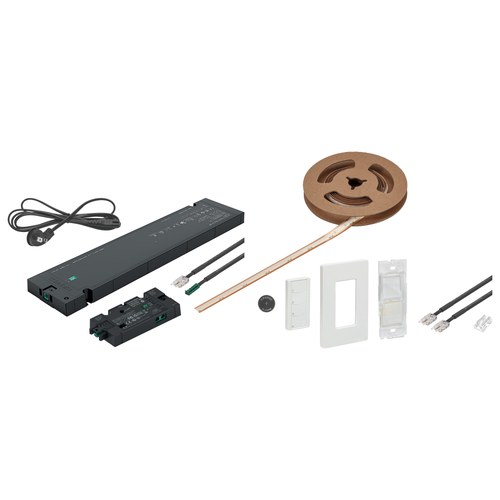
Lighting a run of cabinets, shelves or a display case from separate parts means choosing a driver, an LED strip, a distributor and a switch that work together. Hafele's plug-and-play light kits put those parts in one box under one item number. This post compares three of them, one for each light color: tunable white, warm white 3000 K and cool white 4000 K.
Hafele designed the kits for cabinet, shelf and display lighting in homes and commercial interiors. Its product description sums up the setup in one line: plug the power cord into the driver, connect the Connect Mesh distributor, attach the LED strip and pair the wireless 4-button wall switch, with no cutting or soldering.
Hafele 833.96.375, 833.96.376 and 833.96.377 compared
| Kit | Light color | LED strip |
|---|---|---|
| 833.96.375 | Tunable white | LED 3108 |
| 833.96.376 | Warm white, 3000 K | LED 3105 |
| 833.96.377 | Cool white, 4000 K | LED 3105 |
The tunable kit uses Connect Mesh distributor 850.00.847. The 3000 K and 4000 K kits use 850.00.845. Hafele's quick setup sheets for 833.96.375 and 833.96.377 are both headed 24 V, and each lists a 5 m (196-7/8 in.) LED ribbon in the box. For the 3000 K kit we can confirm only the LED 3105 strip and the 850.00.845 distributor; we have no quick setup sheet for it, so its box contents are not listed here.
What is in the box: 833.96.375 and 833.96.377
The package contents page of each quick setup sheet lists nine required components. Seven item numbers are the same on both sheets. Only the LED ribbon and the distributor differ between the two sheets.
| Part | 833.96.375 | 833.96.377 |
|---|---|---|
| Driver | 833.95.011 | 833.95.011 |
| Power cord, 2 m | 833.95.017 | 833.95.017 |
| LED ribbon, 5 m | 833.76.532 (tunable) | 833.76.522 (4000 K) |
| Distributor, 2-way | 850.00.847 | 850.00.845 |
| Leads, 2 m (2 pcs) | 833.75.764 | 833.75.764 |
| 4-button wall switch | 850.00.951 | 850.00.951 |
| Wall plate | 820.66.753 | 820.66.753 |
| Mounting bracket | 825.73.775 | 825.73.775 |
| Battery, CR2032 | 002.99.032 | 002.99.032 |
The power cord and the leads are 2 m (78-3/4 in.) long. Under a separate heading, Optional Components, both sheets also show clip connectors 824.19.424 (quantity 10), which connect cables to ribbons, ribbons to ribbons and cables to cables, and interconnecting leads 833.75.766 (quantity 2), which connect ribbons to ribbons. The step 1 photos show a power strip; the sheet notes that it is not included.
What each part does
- Driver and power cord: the cord plugs into the driver and then into a power outlet, and the distributor connects to the driver.
- Connect Mesh distributor: the two ports on its front face take the LED leads. The single port on its right side is a pass-through port, used to power an additional device.
- Leads: join the LED ribbon, a COB Gold strip light in the sheets' wording, to the distributor.
- 4-button wall switch: runs on the CR2032 battery and pairs wirelessly with the distributor. The wall plate and the mounting bracket are on the parts list, but the steps do not show how they are fitted.
Page 4 of each sheet has QR codes to download the Hafele Connect Mesh App, which Hafele offers for advanced control and customization. Step 2 has its own QR code, labeled How to connect lead to COB ribbon.
Setup steps
The two quick setup sheets give the same seven steps. Only the ribbon and distributor numbers differ.
- Power the system. Plug the power cord into the driver, connect the Connect Mesh distributor to the driver, then plug the cord into a power outlet. The red light on the distributor begins to blink.
- Connect the lights. Connect a lead to the LED ribbon: line up the positive side of the strip with the red wire of the lead, then push the COB Gold strip under the metal contacts. Next, plug the lead into either front port of the distributor, and the lights turn on.
- Power the switch. Remove the back cover of the 4-button wall switch and insert the battery. The indicator light blinks and stops after 60 seconds. To return the switch to pairing mode, press and hold the reset button for 10 seconds.
- Start pairing. Press the reset button on the back of the switch once. The indicator light flashes quickly.
- Pairing process. The distributor light and the connected lights flash.
- Pairing complete. The distributor lights stop flashing, and its light stays solid for about 5 seconds. The switch begins to blink slowly.
- Finish setup. Press the reset button on the back of the switch to take it out of pairing mode; the indicator light stops blinking. Put the cover back on the switch.
The system is then paired and ready to use. To pair the same switch with more Connect Mesh distributors, the sheet says to press the reset button again to put it back into pairing mode.
The sheets stop at connecting and pairing. They do not show where or how to mount the strip, the driver or the switch.
Tunable white, 3000 K or 4000 K?
The setup sheets show the difference on the wall switch. On the tunable white kit, a tap on button 2 raises the color temperature and a tap on button 3 lowers it, so the shade of white can be changed after the lights are in. For the 4000 K kit, the sheet lists no tap function for those two buttons and says to customize them in the Connect Mesh app. On both sheets, a tap on button 1 turns the lights on and holding it raises the brightness; a tap on button 4 turns them off and holding it lowers the brightness.
The 3000 K and 4000 K kits each give one fixed shade of white, warm or cool, as their names say. Pick the one that suits the room, or the one that matches lighting already installed nearby. The tunable kit makes sense when the color is not settled yet, or when you may want a different shade later.
Related pages
If you would rather choose the parts one by one, our guide to Hafele Loox LED lighting explains how Hafele's Loox drivers, distributors and switches connect. Other Hafele hardware is on our Hafele brand page, and more cabinet lighting is in our cabinet and furniture lighting category.
Not sure which light color to choose? Our customer support team is available Monday - Friday, 8 AM - 4 PM Central Time, at 1-888-800-7789 or [email protected].
Related Products